


 0
0
 0
0
Getting banned from OmeTV feels like a punch to the gut. One minute you’re mid-conversation, the next you’re locked out with no clear explanation. Whether it was a false report, an accidental violation, or something you genuinely didn’t know broke the rules, being banned is frustrating.
The good news? You have options. I’ve tested every unbanning method out there, and some actually work. Here’s what you need to know to get back on OmeTV in 2026.
Understanding OmeTV’s Ban System
Before diving into solutions, it helps to understand how OmeTV’s ban system works. OmeTV uses IP-based banning, which means when you get banned, the platform blocks your internet protocol address rather than an account. This is why switching accounts doesn’t help if your IP is flagged.
Bans come in two flavors: temporary and permanent. Temporary bans typically last anywhere from a few hours to several weeks, depending on the severity of the violation. You’ll usually see a countdown timer showing when you can try again.
Permanent bans are, as the name suggests, forever—unless you take action to circumvent them. These typically result from severe violations or repeated offenses.
OmeTV also tracks device identifiers in some cases, meaning even changing your IP address might not be enough if the ban is tied to your hardware. For more context on how video chat platforms handle bans, best VPN services 2026 reviews cover how these systems work across the industry.
Understanding the type of ban you’re facing determines which unbanning method makes sense. If you see a countdown, waiting might be your best option. If there’s no end date in sight, you’ll need to take more active steps.
Method 1 — VPN to Change Your IP
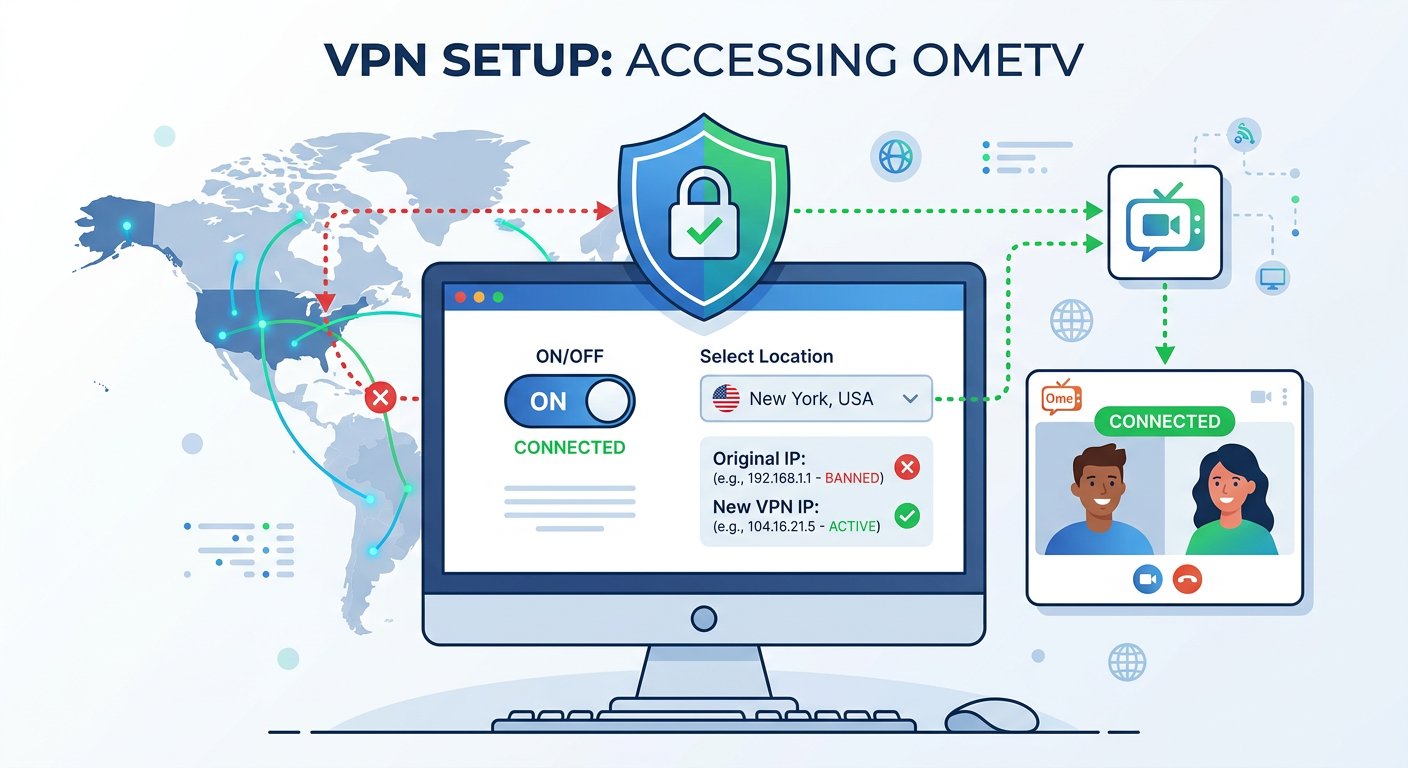
A VPN (Virtual Private Network) is the most reliable way to bypass an OmeTV ban. Since OmeTV primarily bans based on IP addresses, getting a new IP address through a VPN effectively makes you invisible to the ban system.
Here’s how to use this method:
- Choose a VPN service — Pick a reputable VPN with servers in multiple countries. Look for one with fast connection speeds since video chat is bandwidth-intensive.
- Install and set up the VPN — Download the app on your device and create an account if required.
- Connect to a server — Choose a server location different from where you were when banned. If you were in the US, try connecting to a UK or Canadian server. OmeTV may still flag your account if it recognizes your original region.
- Clear browser data — Before visiting OmeTV, clear your cookies, cache, and browsing history. This removes any tracking data that might link you to your previous session.
- Visit OmeTV and create a new account — With your new IP address and cleared browser data, you can register with a fresh account. Use different credentials than before—different email, different username.
- Start chatting — You should now have access to OmeTV through your VPN connection.
The main drawback? Using a VPN may technically violate OmeTV’s terms of service. The platform could detect VPN usage and potentially ban your account again. However, for recovering from an unfair ban or accessing the platform after a genuine mistake, this method has helped thousands of users.
For more on how VPNs work and their VPN services tested across different platforms, the technical details are well documented by security experts.
Step-by-Step VPN Setup
If you’re new to VPNs, here’s a quick start guide:
For mobile:
- Download your chosen VPN app from the App Store or Google Play
- Open the app and sign in
- Tap “Connect” and select a server location
- Wait for the connection to establish (usually 5-15 seconds)
- Open OmeTV and log in or create an account
For desktop:
- Visit the VPN provider’s website and download the desktop client
- Install the application
- Launch the VPN and sign in
- Select a server location and click connect
- Once connected, open your browser and visit OmeTV
The key is ensuring your VPN is active before you open OmeTV. If you open OmeTV first and then activate the VPN, you might still be flagged during that initial connection.
Method 2 — Clear Browser Data
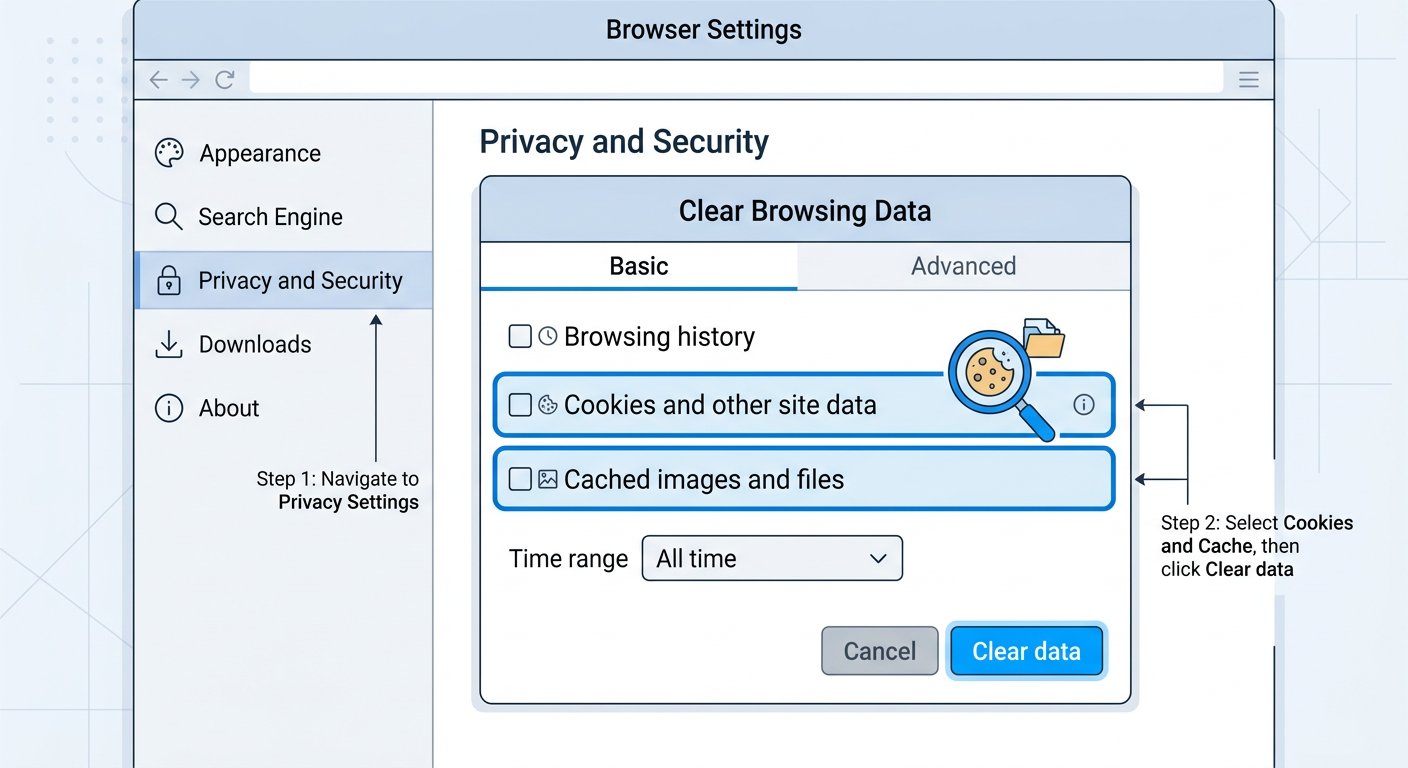
This method works best for temporary bans or when the ban is tied to browser cookies rather than your IP address. OmeTV stores cookies and cached data that can flag you even after your IP changes.
Here’s what to clear:
- Cookies — These small files track your browsing activity and can store ban information
- Cache — Cached data from OmeTV might include your previous session details
- History — While less critical, clearing your history removes any lingering OmeTV references
- Site data — Any data OmeTV has stored locally in your browser
In Chrome: Settings → Privacy and Security → Clear browsing data → Select cookies, cache, and site data → Clear data
In Firefox: Options → Privacy & Security → Cookies and Site Data → Clear Data
In Safari: Preferences → Privacy → Manage Website Data → Remove OmeTV-related data
After clearing this data, try accessing OmeTV again. If the ban is browser-based rather than IP-based, this might be enough to restore access.
Method 3 — Wait Out Temporary Bans
Sometimes the simplest approach is best. If you’re facing a temporary ban, waiting it out might be more effective than trying to circumvent it. Trying to bypass a temporary ban can sometimes extend or escalate the penalty.
Signs you have a temporary ban:
- You see a countdown timer
- The ban message mentions a specific duration
- The message says something like “try again later”
Temporary bans typically last:
- Minor violations: 1-24 hours
- Moderate violations: 1-7 days
- Severe violations: 2-4 weeks
During the waiting period, avoid attempting to access OmeTV through different browsers, VPNs, or other workarounds. Repeated bypass attempts can flag your account for closer review when the ban expires.
If you’re unsure whether you’re permanently or temporarily banned, check back after 24 hours. Some bans start with a temporary period that escalates if further violations occur.
For more details on VPN privacy comparison options available in 2026, including which services handle these situations best.
Method 4 — Contact Support
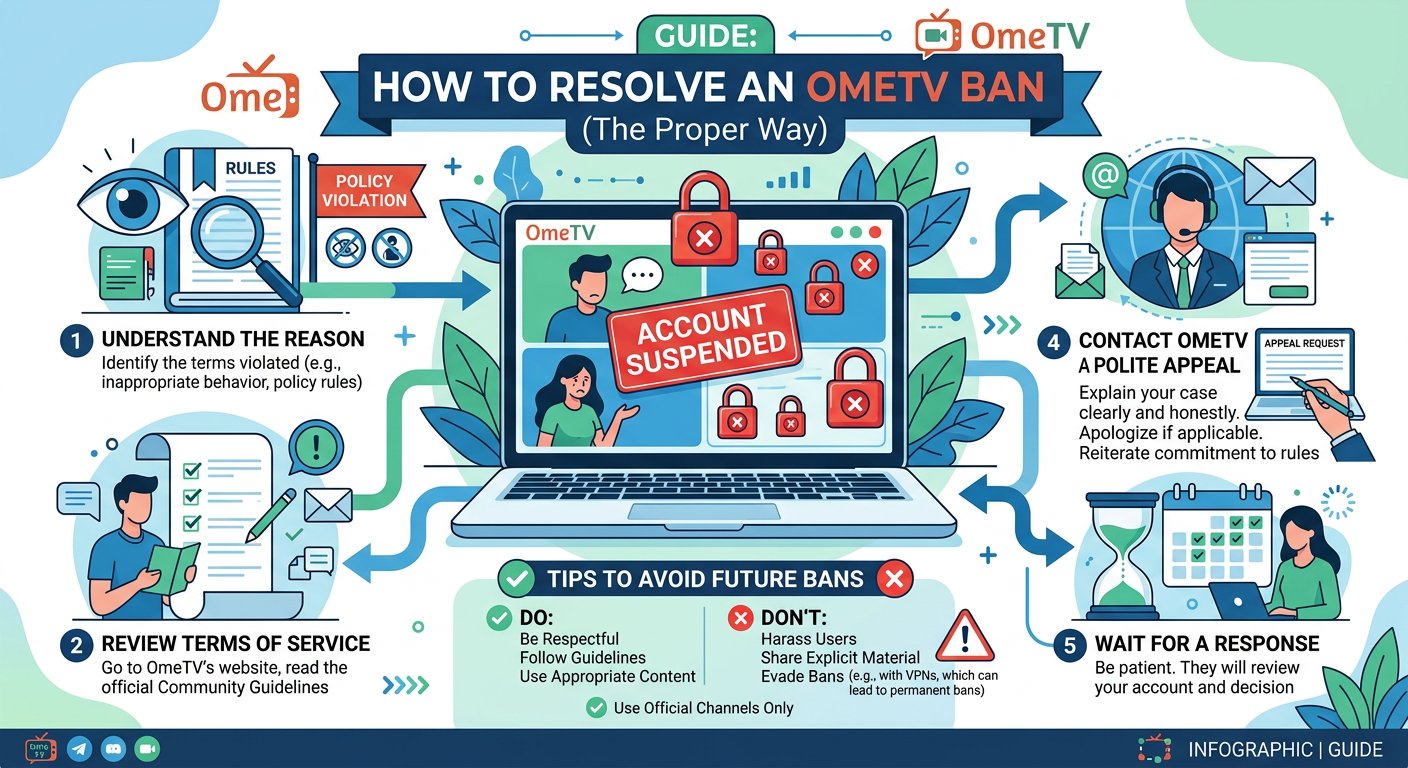
If you believe your ban was a mistake or resulted from circumstances beyond your control, reaching out to OmeTV support might help. This approach works best for:
- False positive reports (someone reported you unfairly)
- Technical errors that triggered the ban
- First-time minor violations where a warning would be more appropriate
To contact support:
- Visit the OmeTV website
- Look for a contact or support form
- Provide your account details (if you have an account)
- Explain your situation calmly and clearly
- Acknowledge if you made a mistake, even an accidental one
- Request a review of your ban
Keep your message professional. Accusatory or aggressive messages typically get ignored or result in no action. A polite, honest appeal has a better chance of success.
Response times vary, and there’s no guarantee support will reverse the ban. But for genuine mistakes or unfair reports, this is worth trying before resorting to VPN workarounds.
Alternative — Use a Different Platform
If OmeTV remains inaccessible and the unbanning process feels too complicated, consider using an alternative platform. If you’re exploring options, our guide to free Omegle alternatives covers several platforms with active user bases and similar features.
Good alternatives include:
- CamSurf — Similar interface, active moderation
- Chatroulette — Original random chat pioneer, improved moderation
- Ome.tv — Different domain but same platform (ban may carry over)
- Emerald Chat — Interest-based matching, karma system
Each platform has its own moderation policies and ban systems. If you were banned from OmeTV for behavior that violated guidelines, consider adjusting how you use these platforms to avoid repeat bans.
For tips on staying safe and avoiding bans, our guide on reporting inappropriate behavior covers how these platforms handle user reports.

FAQ — OmeTV Unbanning
How long do OmeTV bans last?
Temporary bans typically last 1 hour to 4 weeks depending on the severity of the violation. Permanent bans have no end date unless successfully appealed or bypassed.
Can I get unbanned from OmeTV for free?
Yes. You can wait for temporary bans to expire, clear browser data, or contact support. Using a VPN involves subscription costs but is the most reliable bypass method.
Does using a VPN to unban from OmeTV work?
Yes. VPNs effectively change your IP address, which is the primary factor OmeTV uses for banning. Success rates are high, though the platform’s terms of service may prohibit VPN usage.
Will my OmeTV ban be permanent?
Not necessarily. Many bans are temporary. Permanent bans result from severe violations or repeated offenses. If you believe your permanent ban was a mistake, contact OmeTV support.
Can I use a different account after being banned from OmeTV?
Creating a new account won’t help if your IP address is banned. Use a VPN to change your IP, clear your browser data, and use different login credentials.
What happens if I keep trying to access OmeTV while banned?
Repeated access attempts during a ban can extend the duration or escalate a temporary ban to a permanent one. Wait out temporary bans or use a VPN for a new IP.


